Platform Commands
The platform-* commands drive the GitOps half of Konstruct: the environments, workload clusters, registered applications, and deployments the dashboard manages.
For pushing the code in your working directory and getting a URL back, see Deploying Konduit apps instead.
Prerequisites
- The CLI installed and authenticated. See CLI.
- A Git account connected to your organization, so Konstruct can read your repositories.
The Order of Things
Five steps take you from nothing to a running deployment. Each one depends on the last.
konstruct platform-env create --name staging
konstruct platform-env attach --name staging --cluster wc-lon1
konstruct platform-app register --name my-app --repo my-app \
  --pipeline_template go-build --helm_template default/shared \
  --stages staging,production
konstruct platform-app deploy --app my-app --version 1.2.3 \
  --cluster wc-lon1 --env staging
konstruct platform-app-deployment get my-app
Creating and attaching are two separate commands. platform-env create takes no
--cluster; the cluster is associated afterwards with platform-env attach.
Environments
A platform environment is a named grouping of workload clusters that anchors a GitOps path, registry/environments/<environment>/<cluster>.
konstruct platform-env list
konstruct platform-env get staging
konstruct platform-env create --name staging
konstruct platform-env delete staging
list shows the environments usable from your organization: its own, plus the Global ones shared across every organization.
create picks the organization when you have more than one, then offers to associate a cluster straight away. Declining is fine — the environment exists either way, and the CLI tells you nothing can deploy into it yet:
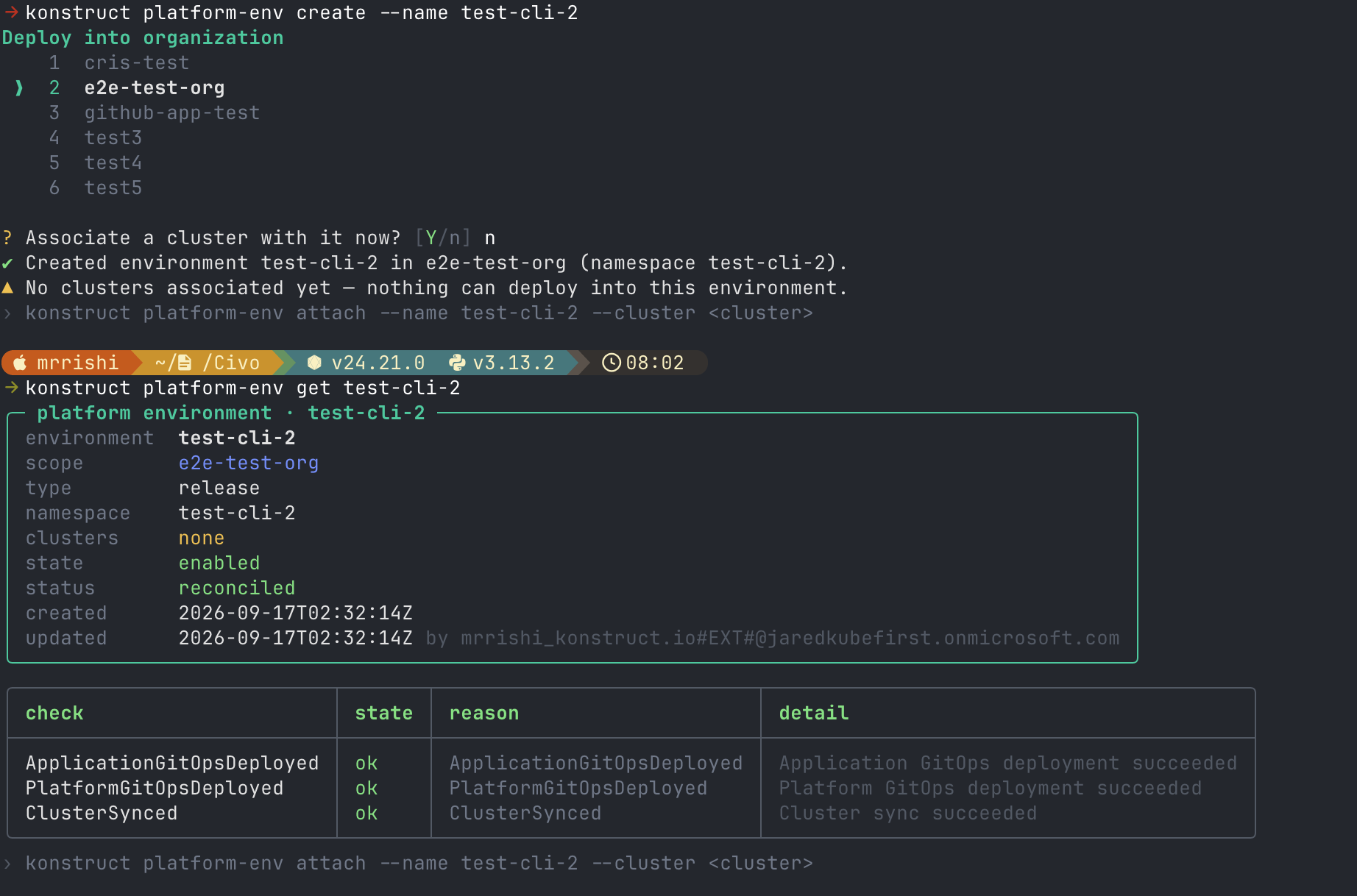
Attach a Cluster
create makes the environment; it does not associate a cluster with it. That is
a second command, and until it runs the environment has no cluster attached and
cannot take a deployment.
konstruct platform-env attach --name staging --cluster wc-lon1
konstruct platform-env detach --name staging --cluster wc-lon1
The operator reflects the association onto the cluster shortly afterwards. konstruct cluster list shows when it has. After attaching, the environment reports the cluster and a fresh updated timestamp:
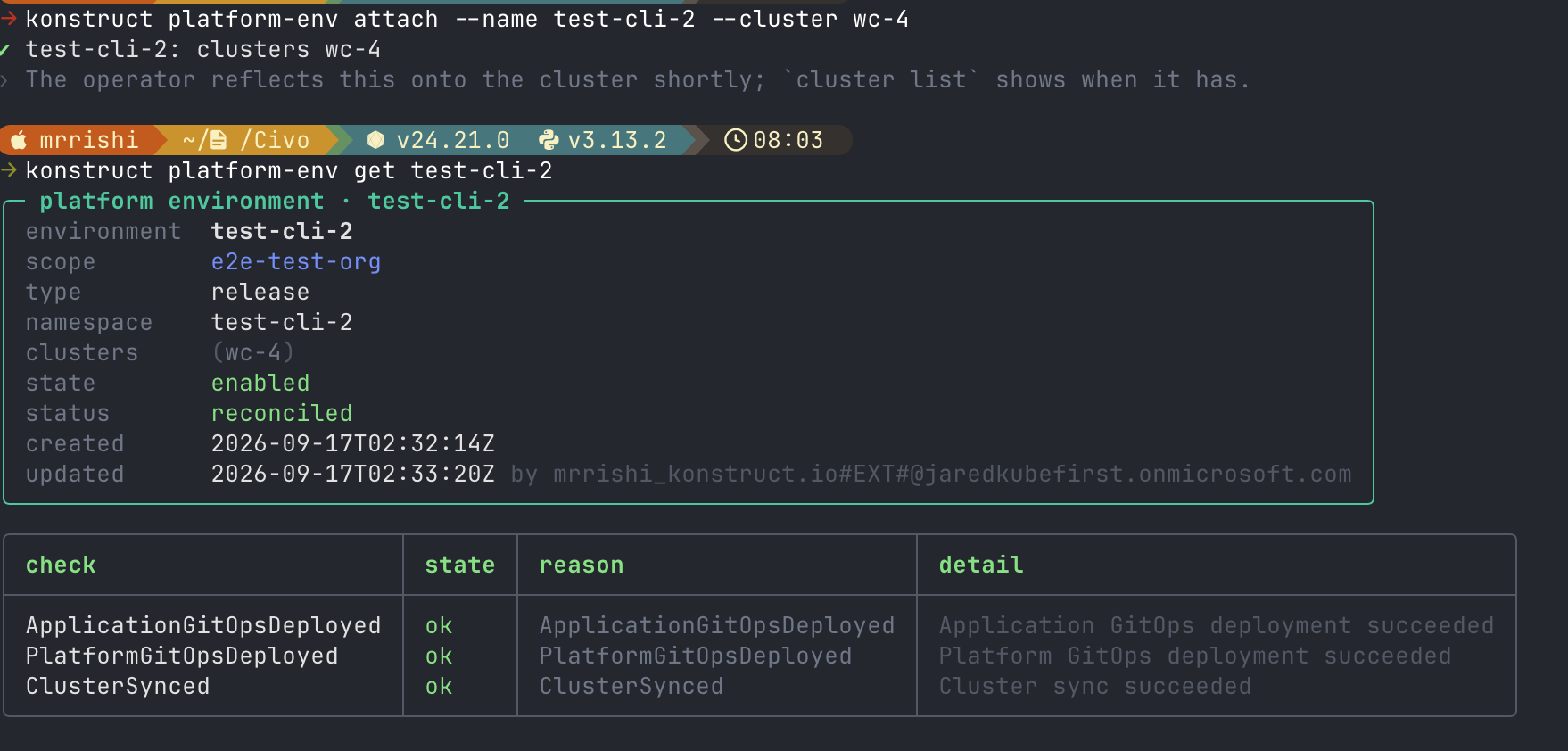
Enabled Is Not Ready
platform-env get reports two separate facts, and they answer different questions:
| Field | Means |
|---|---|
state | The setting you chose: enabled or disabled. |
status | Whether the operator acted on it. |
An environment reads enabled whether or not the operator ever acted on it. A healthy one reports reconciled, with every check passing — ApplicationGitOpsDeployed, PlatformGitOpsDeployed and ClusterSynced in the screenshots above.
When status is anything else, the conditions table names the check that is outstanding and quotes the operator's own message. Deploying into an environment in that state succeeds at the API and then reconciles nowhere, so read it before you go chasing a missing deployment.
Clusters
konstruct cluster list
konstruct cluster wc-lon1
This answers the association question from the cluster's side: which environments can be deployed onto this cluster. A cluster with no environment is called out, because that is the state that makes platform-app deploy refuse.
Registered Applications
Registering an application points it at a repository, a pipeline template, a Helm chart template, and the ordered environments it releases through.
konstruct platform-app register
konstruct platform-app list
konstruct platform-app get my-app
Run register with no flags and it asks for each value in turn, offering only the repositories and templates your organization can see. To script it, name them all:
konstruct platform-app register --name my-app --repo my-app \
  --pipeline_template go-build --helm_template default/shared \
  --stages staging,production --yes
--repo takes the repository's short name, not a URL and not org/repo.
Check the Registration
Registering is asynchronous. The API accepts the record immediately, then the operator resolves the project cluster, Git credentials, cloud account, and IAM roles. Any of those can fail a minute later.
konstruct platform-app get my-app
platform-app list carries the verdict in one column; get carries the reason:
╭────────────────┬───────────┬─────────────────────────┬───────────────────────────────╮
│ check          │ state     │ reason                  │ detail                        │
│ ProjectCluster │ ok        │ ProjectClusterFound     │ Project Cluster acme retrie…  │
│ IAMRoles       │ not ready │ IAMRolesReconcileFailed │ resolve org id: 403 Forbidden │
╰────────────────┴───────────┴─────────────────────────┴───────────────────────────────╯
A registration that never finished will not deploy, and this is the only place the reason appears.
A healthy registration passes seven checks, and get shows the resolved repository URL and the IAM role the pipeline will assume:
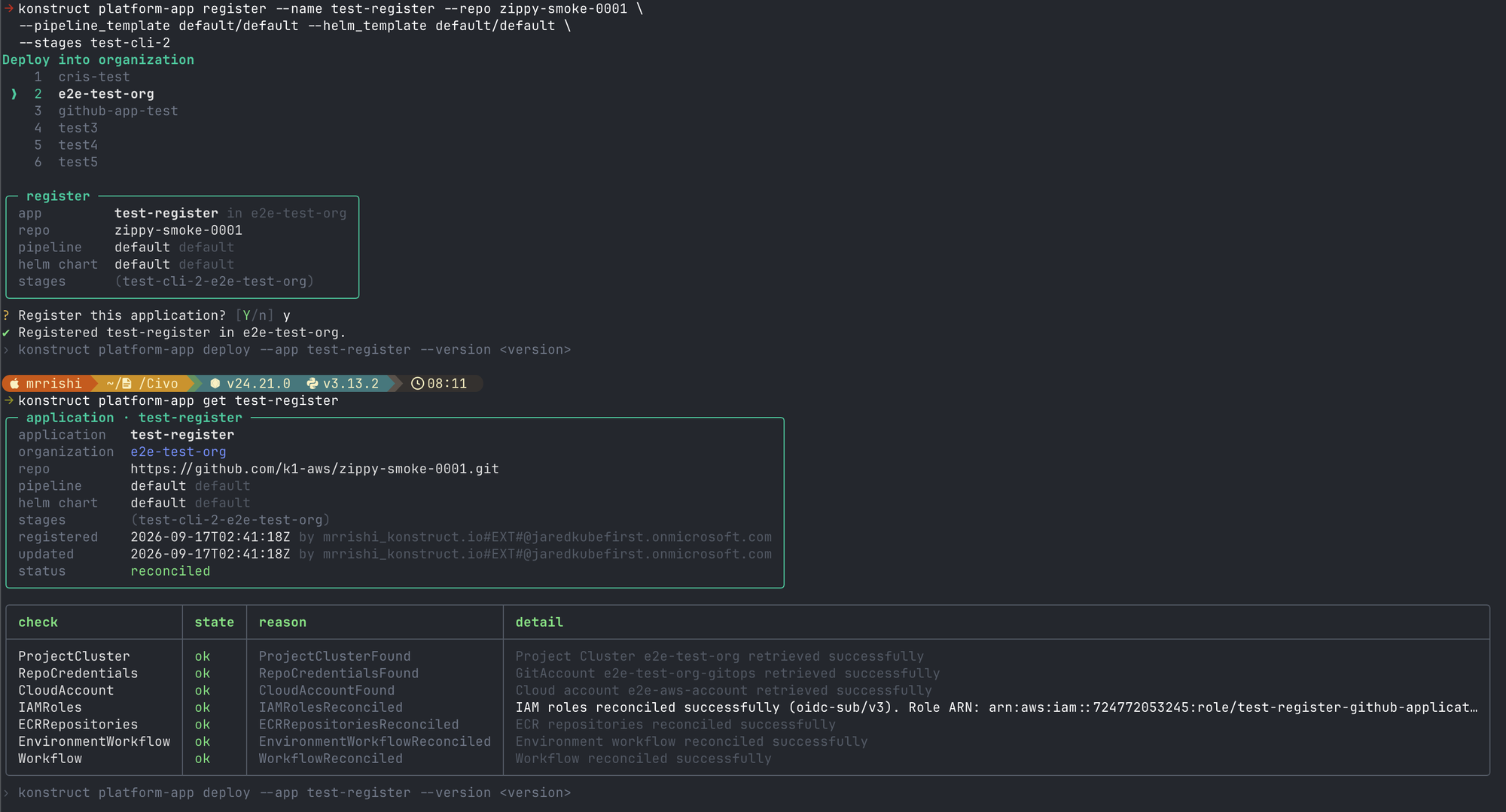
Note the stages row: the environment you passed as --stages test-cli-2 is stored as test-cli-2-e2e-test-org. The CLI applies that encoding for you, because the backend tells an organization's environment from a Global one of the same name by exactly that suffix.
Deployments
Deploy a version of a registered application to a cluster and environment:
konstruct platform-app deploy --app my-app --version 1.2.3 \
  --cluster wc-lon1 --env staging
Choose the cluster before the environment: which environments can take the deployment is a property of the cluster.
Then inspect what happened:
konstruct platform-app-deployment list
konstruct platform-app-deployment get my-app
deploy returns as soon as the API accepts the record. Everything after that — rendering the manifest, committing it, Argo CD syncing it — happens in the operator, so whether the deployment landed is a separate question. get answers it, and links to the rendered GitOps manifest, which is where a stuck deployment is diagnosed.
When an application is deployed to several environments or clusters, narrow it:
konstruct platform-app-deployment get my-app --env staging --cluster wc-lon1
Add --instance for side-by-side deployments of the same application.
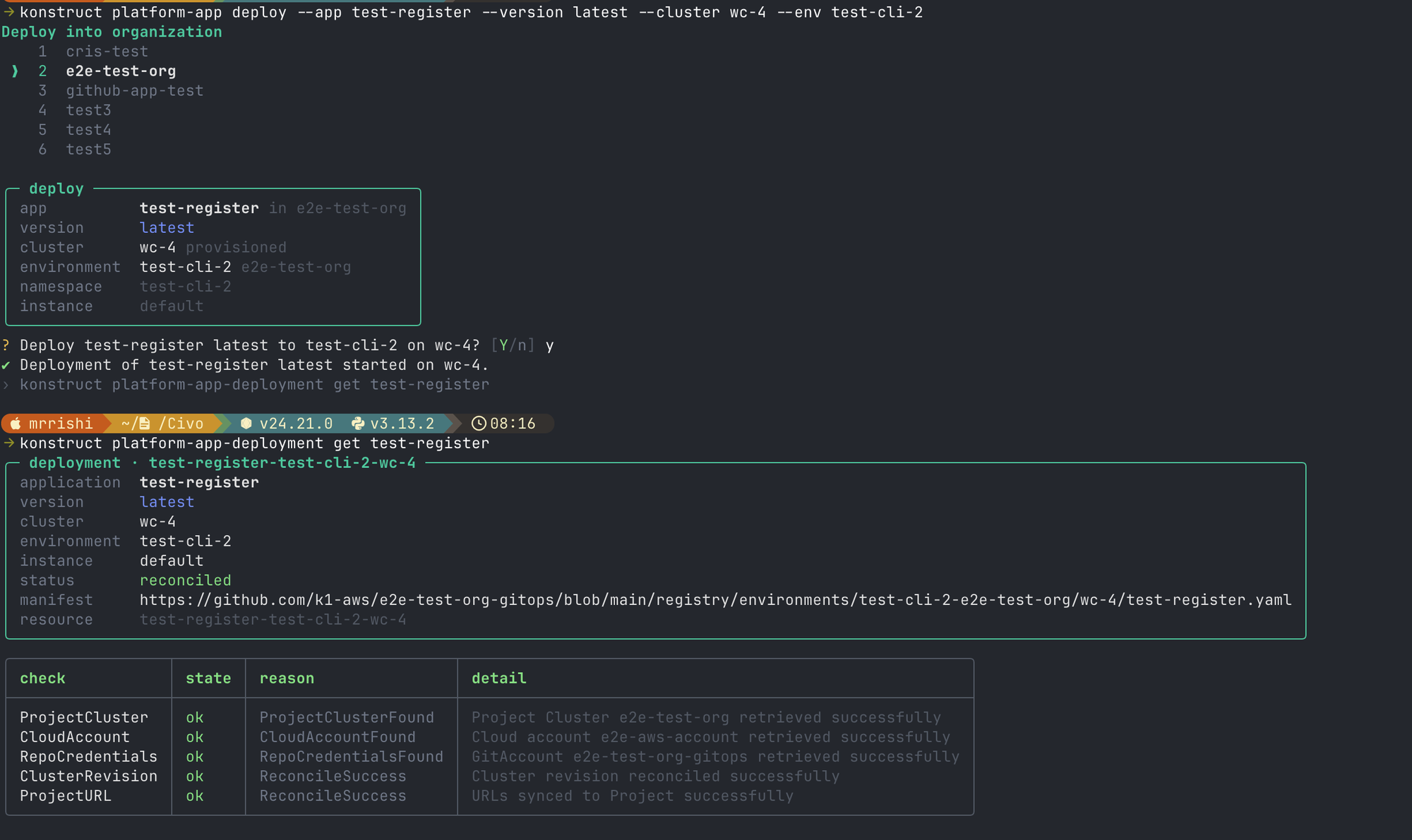
The resource row is the composed name the API addresses this deployment by, and manifest links to the rendered Argo CD Application in the GitOps repository — the file to open when a deployment reports ready but nothing is running.
platform-app deployments still works and is the same listing. It moved to platform-app-deployment list.
Reading Conditions
Environments, registrations, and deployments all report progress the same way, so one habit covers all three.
| State | Means |
|---|---|
ok | The check passed. |
not ready | The check is False. It covers both a reconcile that gave up and one still in flight — the reason column says which. |
pending | The operator has not decided yet. |
A reason ending in Failed will not resolve on its own. A reason like Reconciling will.
What's Next?
- Command reference — every command, its flags, and the endpoint behind it
- Environments — the same concepts in the dashboard
- Pipeline templates — what
--pipeline_templateselects