Konstruct 0.3.6
GitHub App Authentication
Konstruct 0.3.6 introduces GitHub App authentication as the recommended method for Git operations. Existing clusters using PAT authentication will continue to work without changes. Migration to GitHub App is only required when you choose to switch from PAT to GitHub App authentication.
GitHub App authentication provides secure, short-lived installation tokens and does not depend on individual user accounts. You can migrate at your own pace — PAT-based clusters remain fully functional.
Migrate from PAT to GitHub App
Prerequisites
- A GitHub App is configured for your Konstruct instance. See GitHub App Setup.
- The GitHub App is installed on the GitHub organization(s) used by your existing clusters.
Steps
-
Go to the organization you want to migrate.
In the Konstruct UI, navigate to Organizations and select the organization you want to switch from PAT to GitHub App.
-
Open the Git connection tab.
Click the Git connection tab in the organization view.
-
Connect via GitHub App.
Click Connect and complete the GitHub App authorization flow. This will redirect you to GitHub where you authorize the Konstruct GitHub App and select the organization to install it on.
-
Confirm the connection.
After completing the flow, you should see the GitHub connected status with your Konstruct repositories listed:
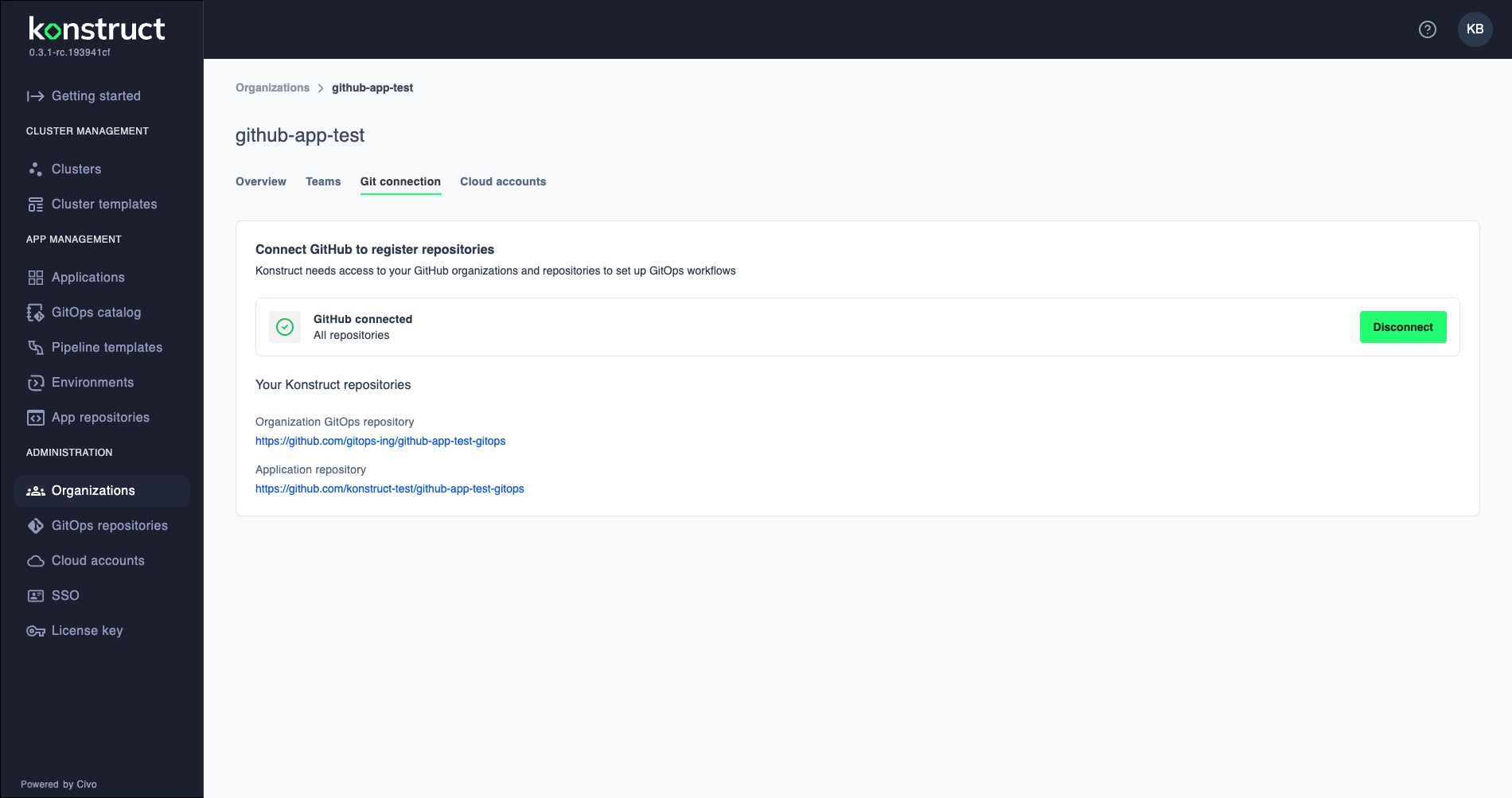
-
Update the ArgoCD secrets and Crossplane secrets on the management cluster as described in the next section.
Update ArgoCD Repo Credentials on the Management Cluster
When migrating from PAT to GitHub App, the ArgoCD repository credential secrets on the management cluster must be updated. These ExternalSecrets pull credentials from Vault and create ArgoCD repo secrets — no changes are needed on the workload clusters themselves.
This only applies to clusters you are actively migrating from PAT to GitHub App. Clusters that remain on PAT do not need any changes.
What Changed
The ArgoCD repo credential ExternalSecrets on the management cluster now use GitHub App fields (githubAppID, githubAppInstallationID, githubAppPrivateKey) instead of PAT fields (username, password).
Steps
-
Update Vault secrets.
Ensure the ArgoCD repo credential paths in Vault (
argocd/repo-credentials-template/<PROJECT_NAME>andargocd/repo-credentials-template/<PROJECT_NAME>-platform) contain the new GitHub App fields:type— e.g.,giturl— the repository URLgithubAppID— the GitHub App IDgithubAppInstallationID— the installation ID for the organizationgithubAppPrivateKey— the GitHub App private key (PEM format)
-
Update the ArgoCD repo credential ExternalSecrets on the management cluster.
In the management cluster's GitOps repo, update
secrets/secret.yaml— replace the PAT fields in both ExternalSecret resources (downstream and platform) with GitHub App fields:data:
type: "{{ .type }}"
url: "{{ .url }}"
githubAppID: "{{ .githubAppID }}"
githubAppInstallationID: "{{ .githubAppInstallationID }}"
githubAppPrivateKey: "{{ .githubAppPrivateKey }}"Also update
crossplane-components/crossplane-secrets.yaml— replace the oldgit-credentialsExternalSecret with agithub-app-credentialsExternalSecret:data:
type: "{{ .type }}"
url: "{{ .url }}"
app_id: "{{ .githubAppID }}"
installation_id: "{{ .githubAppInstallationID }}"
github_app_private_key: "{{ .githubAppPrivateKey }}"Commit and push the changes. ArgoCD will sync the updated ExternalSecrets automatically.
-
Update the Crossplane Terraform provider and logs streamer.
In
crossplane-components/controllerconfig.yaml, update the provider and logs streamer images:containers:
- name: package-runtime
image: ghcr.io/konstructio/provider-terraform:v0.0.1-rc.2- name: log-streamer
image: ghcr.io/konstructio/logs-streamer:v0.0.10Also add Prometheus scrape annotations to the pod template metadata:
annotations:
  prometheus.io/scrape: "true"
  prometheus.io/port: "8080"
prometheus.io/path: "/metrics" -
Add metrics port to the Crossplane provider service.
In
crossplane-components/svc.yaml, add the metrics port:ports:
- port: 9090
targetPort: 9090
protocol: TCP
name: http
- port: 8080
targetPort: 8080
protocol: TCP
name: metrics -
Add the Crossplane provider Terraform ServiceMonitor.
Create
crossplane-components/servicemonitor.yamlto enable Prometheus metrics collection from the Crossplane Terraform provider:apiVersion: monitoring.coreos.com/v1
kind: ServiceMonitor
metadata:
name: crossplane-provider-terraform
namespace: crossplane-system
labels:
app: crossplane-provider-terraform
spec:
namespaceSelector:
matchNames:
- crossplane-system
selector:
matchLabels:
app: log-streamer
endpoints:
- port: metrics
path: /metrics
scheme: http
interval: 15s -
Add kube-prometheus-stack for workload clusters.
Create
35-kube-prometheus-stack.yamlto deploy a Prometheus instance on workload clusters that forwards metrics to the management cluster via remote write:apiVersion: argoproj.io/v1alpha1
kind: Application
metadata:
name: kube-prometheus-stack-<WORKLOAD_CLUSTER_NAME>
namespace: argocd
annotations:
argocd.argoproj.io/sync-wave: '35'
finalizers:
- resources-finalizer.argocd.argoproj.io
spec:
project: <WORKLOAD_CLUSTER_NAME>
destination:
namespace: observability
name: <WORKLOAD_CLUSTER_NAME>
source:
repoURL: https://prometheus-community.github.io/helm-charts
chart: kube-prometheus-stack
targetRevision: 68.3.0
helm:
releaseName: kube-prometheus-stack
values: |
grafana:
enabled: false
alertmanager:
enabled: false
prometheus:
enabled: true
prometheusSpec:
scrapeInterval: 5s
retention: 2h
externalLabels:
cluster: <WORKLOAD_CLUSTER_NAME>
remoteWrite:
- url: "https://prometheus-remote-write.<DOMAIN_NAME>/api/v1/write"
serviceMonitorSelectorNilUsesHelmValues: false
podMonitorSelectorNilUsesHelmValues: false
storageSpec: {}
prometheusOperator:
enabled: true
defaultRules:
create: false
kubeStateMetrics:
enabled: false
nodeExporter:
enabled: false
kubeApiServer:
enabled: false
kubelet:
enabled: false
kubeControllerManager:
enabled: false
coreDns:
enabled: false
kubeScheduler:
enabled: false
kubeProxy:
enabled: false
kubeEtcd:
enabled: false
syncPolicy:
automated:
prune: true
selfHeal: true
syncOptions:
- CreateNamespace=true
- ServerSideApply=trueReplace
<WORKLOAD_CLUSTER_NAME>and<DOMAIN_NAME>with your cluster name and domain. -
Update the cluster templates (for new clusters).
Apply all the above changes to the corresponding files under
templates/workload-project-cluster/in konstruct-templates so that newly provisioned clusters include these updates from the start. -
Verify ArgoCD can authenticate.
Check that ArgoCD can sync applications by viewing the ArgoCD UI or checking application sync status. The repository secrets should now contain
app_id,installation_id, andgithub_app_private_keyfields instead ofusernameandpassword.
Troubleshooting
- Clone fails with
authentication failed: Ensure the GitHub App is installed on the correct organization and that the installation has the required repository permissions. - GitAccount not updated: Verify that the old PAT-based GitAccount was deleted and the new GitHub App GitAccount exists in the same namespace.
- Operator not picking up changes: Restart the workloadcluster-operator pod or wait for the next reconciliation cycle.
- ArgoCD repo secret missing GitHub App fields: Check that the Vault path contains the new fields (
githubAppID,githubAppInstallationID,githubAppPrivateKey) and that the ExternalSecret has been updated. - Crossplane Terraform provider fails to clone: Verify the
github-app-credentialsExternalSecret exists in thecrossplane-systemnamespace and that it references the correct Vault path.